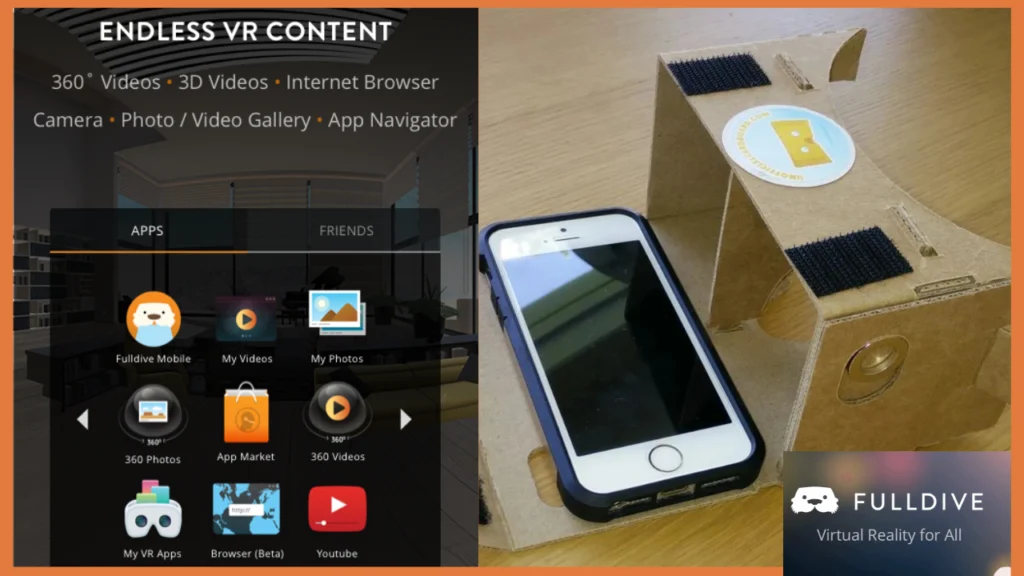
Fulldive VR is a smartphone-based virtual reality platform that works like a “VR home screen” and content hub. Fulldive VR has emerged as one of the most accessible and innovative platform in the VR world. Fulldive VR is a mobile based virtual reality platform user can explore it in the following ways
- Discover and launch VR apps and games.
- Watch 360° and 3D videos
- Browse the web in VR.
- View your own photos and videos in a VR environment.
- Interact with a social feed and community.
- Earn Fulldive Coins, which can be converted into crypto (Bitcoin or Ethereum) or gift cards through their broader Fulldive ecosystem.
It’s not a PC/console-level “full-dive” neural VR system. It’s a mobile app that aims to make VR more social, more gamified, and more accessible to people with just a phone and a cheap headset.
Company Background and History
2.1 Founding and Mission
Fulldive is a startup based in the San Francisco Bay Area (Berkeley / SF), founded around 2014–2015 by Giovanno Yosen Utomo, often written as Yosen Utomo and Ed Ow.
The company’s stated mission is to make affordable, easily accessible VR and AR software for everyone, especially through smartphone-based VR.
Key points about the company:
- Founded: ~2014–2015
- Headquarters: San Francisco / Berkeley area, with staff also in China and Russia,
- Focus: Mobile VR platform (Fulldive VR) and later rewards-based mobile browser and utility apps Fulldive Browser, AdBlock VPN, cleaners, etc
- Downloads: Over 10–14 million+ total downloads across products, according to their own materials.
2.2 Evolution of Fulldive VR
Originally, Fulldive VR launched as a VR discovery and navigation platform for Google Cardboard and similar mobile headsets, aggregating VR content from sources such as YouTube and other apps.
Over time, they added:
- Social features (follow friends, likes, comments.
- Reward mechanics (Fulldive Coins) for spending time in VR
- Tighter integration with Fulldive Browser, their Web3-ish, rewards browser
3. Where and How You Can Use Fulldive VR
3.1 Platforms
As of 2025, Fulldive VR is mainly focused on Android:
- Fulldive VR – Virtual Reality on Google Play
- Fulldive VR X (Experimental) – an updated experimental version with improved rendering and rewards integration.
- Older builds are also available from third-party APK mirrors.
For iOS, there isn’t a full VR shell app like the Android version, but there is the Fulldive Browser with Coins Fulldive, which focuses on rewards for browsing and supporting charities.
3.2 Headset Compatibility
Fulldive VR is designed for:
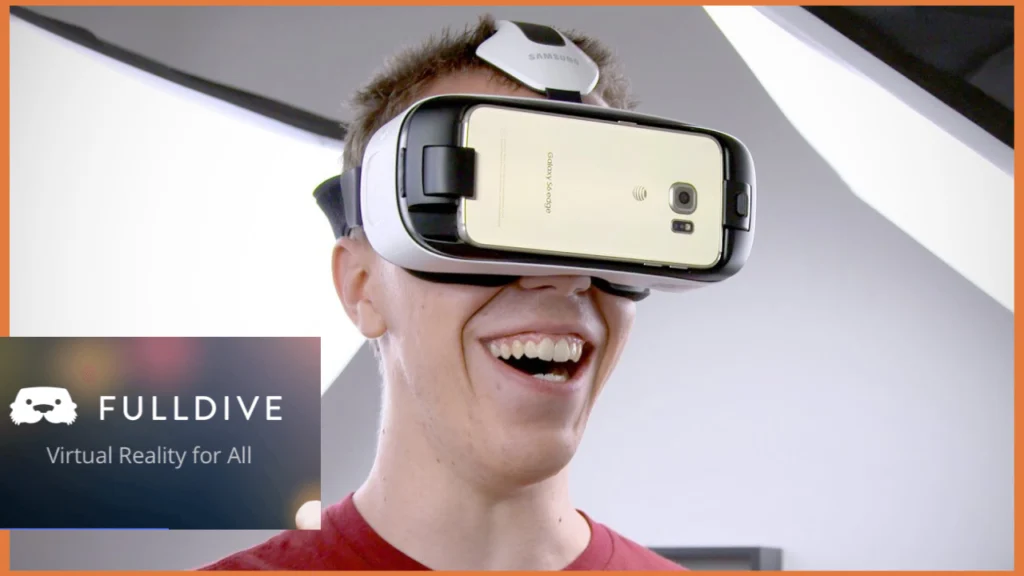
- Google Cardboard-style headsets
- Generic mobile VR viewers that accept a smartphone
- Historically, Google Daydream builds also existed some are still listed as “Daydream” variants on APK Mirror.
It does not require expensive hardware like a Meta Quest or PC VR setup. A mid-range Android phone plus a basic headset is enough.

4. Core Features in Detail
4.1 VR Content Aggregation and Navigation
Fulldive VR’s main job is to act as a VR launcher and navigation layer:
- You can browse thousands of 3D and 360° videos, panoramas, apps, and games from within the VR shell.
- The app essentially becomes your VR home environment, where each tile or panel represents apps, friends, or content.
On its official “Virtual Reality for Everyone” page, Fulldive describes the app as an immersive mobile VR hub where you can browse, download, and use hundreds of VR apps without removing the headset.
4.2 Built-in VR Video Player
Fulldive VR acts as a video player that supports:
- Regular (“flat”) videos displayed in a virtual cinema
- 360° videos that follow your head movement
- 3D/ stereoscopic videos where left and right eye images are separated
This lets you watch content from platforms like YouTube in a VR theater-style environment.
4.3 Social VR Platform
Fulldive markets itself not only as a content hub but as a social VR platform:
- Follow what your friends watch.
- View a social feed what’s trending, what others like
- React, comment, and share favorite videos in VR.
That social layer makes it feel more like a “VR community” than just a video player.
4.4 VR Web Browser
Fulldive VR includes web browsing in VR, allowing you to:
- Open websites in virtual screens
- Watch embedded videos in VR.
- Scroll pages using gaze controls or simple input
The Fulldive Browser a separate app in the same ecosystem emphasizes private browsing and rewards, while Fulldive VR integrates browser-like functionality into the VR shell.
4.5 System Tools: Gallery, Camera, App Navigator
Older and current descriptions mention VR tools built into Fulldive VR
- VR Gallery – View your own phone photos and videos like they’re hanging on walls or in a cinema.
- VR Camera – Capture photos or video for later viewing in VR.
- App Navigator/Launcher – Launch other VR apps/games from within the VR environment.
4.6 Rewards System: Fulldive Coins
One of the major unique features is the earn-while-you-use model:
- Users earn Fulldive Coins when they spend time watching videos, browsing in VR, listening to music, or using Fulldive’s ecosystem.
- Coins can be redeemed for:
- Bitcoin Cash
- Ethereum
- Other crypto
- Gift cards
- Or donated via Fulldive Browser to charities feed children, save animals, plant trees, etc.
This ties Fulldive VR directly into their broader “rewards browser” ecosystem, letting people earn something back for their time online.
5. User Experience: Step-by-Step Walkthrough
Here’s what using Fulldive VR typically looks like on Android:
5.1 Installation & Setup
- Download Fulldive VR or Fulldive VR X from Google Play or a trusted app store.
- Open the app in normal or non-VR mode to
- Accept permissions storage, maybe microphone, etc
- Optionally create an account or sign in to sync social and rewards.
- Insert your phone into a Cardboard-style headset and tap “Enter VR”.
Your can also download directly form Apple store.
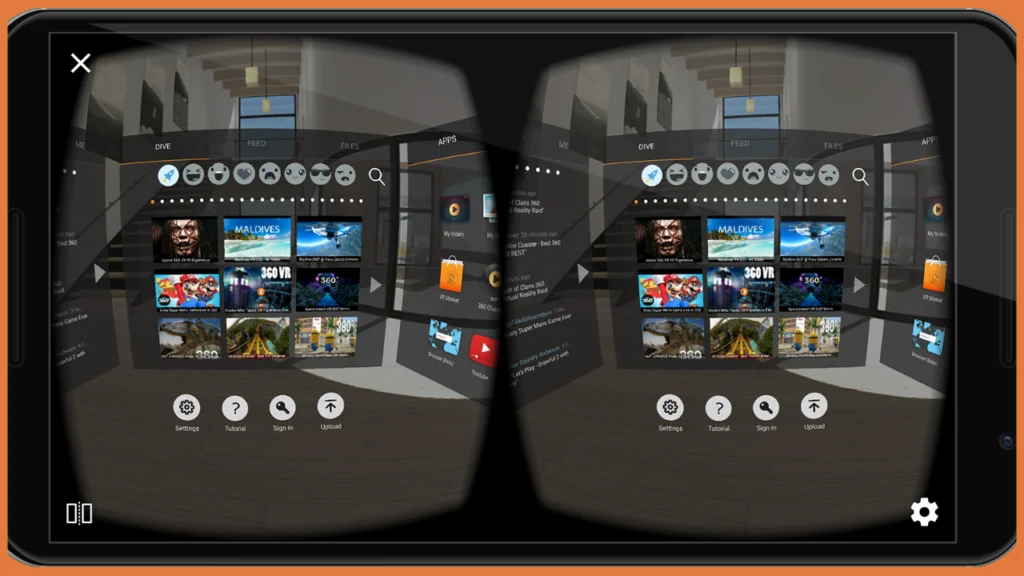
5.2 Navigating the VR Interface
Inside VR, you’ll usually see:
- A home environment with panels or tiles representing:
- Apps
- Friends
- Recommended content
- A gaze cursor in the center of your view
- Simple icons for
- Settings
- Profile
- Store / Library
- Browser
You point your head at a tile and either wait a second (dwell selection) or tap a headset button/controller if available.
5.3 Discovering and Watching Content
From the home
- Open VR video sections to see trending or recommended content.
- Choose between 360°, 3D, or normal videos.
- You can switch to a “cinema” mode large virtual screen or an immersive 360° mode where you’re inside the video.
Because Fulldive aggregates content and allows deep linking to apps like YouTube, much of the experience is built around discovery and quick switching between media.
5.4 Earning Rewards While Using VR
As you:
- Watch videos
- Browse the web
- Use associated Fulldive apps.
You accumulate coins in the background. The details rate, caps, etc, can change as the company updates its reward system, but the core idea is: more usage more coins.
You then redeem those coins via connected services like the Fulldive Browser app for crypto, gift cards, or donations.
6. Technical Side: Performance, Sensors, and Requirements
6.1 Phone Requirements
Fulldive doesn’t list extremely strict specs, but based on how VR works and third-party info:
- Mid-range or better Android phone recommended 3–4 GB RAM or more, decent GPU/CPU
- Good gyroscope + accelerometer for tracking head movements
- Sufficient storage for videos and apps
The official descriptions emphasize that Fulldive is “for the masses” and focused on affordability, so it targets a wide range of mid-tier phones rather than only flagships.
6.2 Sensor Calibration
Some listings mention that if your screen drifts left or right while using VR, you should calibrate the phone’s tilt sensors, linking to an Android StackExchange guide on sensor calibration.
That’s a clue that:
- Fulldive VR depends heavily on accurate sensor data.
- If the gyroscope or accelerometer is off, the view inside VR will drift, causing discomfort.
6.3 Rendering and Fulldive VR X
The newer Fulldive VR X (Experimental) version specifically mentions:
- A smoother and crisper experience when watching videos or navigating
- An upgrade to a newer Unity engine
- Tighter integration of the coin rewards system
This reflects constant iteration to improve frame rate, resolution, and latency, which are crucial for reducing VR sickness.
7. Privacy, Data, and Ecosystem Integration
Fulldive’s privacy policy states that
- They share infrastructure, systems, and technology across different Fulldive products Fulldive VR, Browser, Portby, Evry, etc.
- They process user information across these apps to provide a consistent experience, in line with their terms and applicable law.
What this means in practice
- Your data such as usage, preferences, coins, and maybe social activity can be synced and reused across different Fulldive apps.
- The same account might power both Fulldive VR and Fulldive Browser, especially for the rewards and charity parts.
As always, it’s smart to
- Read the latest privacy policy.
- Check what permissions the app requests.
- Decide whether you’re comfortable with the data-sharing across their ecosystem.
8. Strengths and Weaknesses of Fulldive VR
8.1 Strengths
- Low Cost & Accessibility
- Works with cheap Cardboard-style headsets and common Android phones.
- Good entry point for beginners or students exploring VR.
- Content Aggregation
- Brings together VR content, apps, and tools in one place so you don’t have to constantly remove the headset.
- Social Layer
- Watch what others are watching, react, comment, and follow. This makes VR feel less isolating and more like a shared experience.
- Rewards & Crypto/Charity Integration
- Earning coins for doing normal things like watching videos and browsing can be quite motivating.
- The option to donate to charity while browsing or engaging in VR activity is pretty unique.
- Ecosystem of Apps
- Beyond VR, Fulldive also offers browsers, VPNs, cleaners, and other utilities that tie into the rewards system.
8.2 Limitations
- Smartphone VR Limitations
- Quality depends on your phone’s screen, GPU, and sensors.
- Compared to PC/standalone headsets (Quest, PS VR2), graphics and tracking are less advanced.
- Comfort & VR Sickness
- Lower frame rates or sensor drift can cause discomfort.
- Not everyone can handle long VR sessions on a phone.
- Ecosystem Complexity
- To fully benefit from rewards and donations, you may need multiple Fulldive apps and an account, which some users might find confusing.
- Update & Availability Fluctuations
- Over the years, Fulldive VR has been removed, updated, and re-uploaded in various stores. You sometimes have to check different app stores or APK sites for the latest builds.
9. Fulldive VR vs Other VR Experiences
9.1 Fulldive VR vs YouTube VR
- Fulldive VR:
- Acts as a full VR shell home environment, app launcher, browser.
- Has social and rewards features.
- YouTube VR:
- Focused only on YouTube content.
- No native coin rewards or broad VR app discovery.
If your main goal is just watching YouTube in VR, YouTube VR is simple. If you want a hub for many VR apps, plus social and rewards, Fulldive VR is a better fit.
9.2 Fulldive VR vs “Premium Storytelling” Apps
- Apps like Within specialize in high-quality, curated VR films and experiences.
- Fulldive VR is more about user-generated and aggregated content and tools than a polished, studio-style catalog.
9.3 Fulldive VR vs Real Full-Dive
There’s also the concept of “full-dive virtual reality” from anime like Sword Art Online, where your brain connects directly to a virtual world.
It’s important not to confuse the marketing name “Fulldive VR” with true “full-dive” tech, which does not yet exist in consumer form.
10. Who Is Fulldive VR Best For?
Fulldive VR is especially good for
- Teens and students interested in VR but without expensive headsets
- Casual VR users who want to explore 360° videos, VR photos, and simple apps
- People who like social features and seeing what others watch
- Users who enjoy earn-while-you-watch and rewards systems
- Anyone curious about combining VR + crypto rewards + charity
If you already own a high-end standalone headset (like a Meta Quest 3) and mainly care about advanced games, Fulldive VR is less relevant. But if you have an Android phone and a basic viewer, it’s one of the more feature-rich options.
11. Safety Tips for Young Users
Since you’re a teen, a few quick safety reminders:
- Time limits: Try to keep VR sessions to 10–20 minutes, especially at first.
- Physical space: Use it in a safe, open area where you won’t bump into furniture.
- Eyes & posture: Take breaks to rest your eyes, and don’t hold your neck in one stiff position for too long.
- Content choices: Stick to age-appropriate videos and apps; avoid anything that feels disturbing or too intense.
- Privacy: Think before granting permissions or sharing personal details in any social feed.
Conclusion
Fulldive VR is changing how we experience virtual reality by keeping everything simple, social, and easy to use. In 2025, its mix of immersive content, community features, and support for affordable VR headsets makes it a great choice for everyday users. Whether you are trying VR for the first time or looking to explore more, Fulldive VR offers a smooth, friendly way to enjoy the virtual world.
FAQs
Does full dive VR exist?
No, true full-dive VR does not exist yet. We don’t have the technology to connect the brain directly to a virtual world or simulate all senses perfectly. Today’s VR is limited to headsets, controllers, and basic haptic tools. Full dive remains science fiction for now.
Is fully immersive VR possible?
Psychological immersion, where you feel present in the virtual world, is already possible with modern headsets. But complete sensory immersion that replaces real-life feeling isn’t achievable yet. Scientists would need safe brain interfaces and full sensory simulation, which we don’t have.
Is there a full body VR?
We have partial full-body VR, like body trackers, treadmills, gloves, and haptic suits. These allow basic physical feedback and movement tracking. But there is no system that perfectly simulates your whole body or lets you “feel everything” in VR.
How far are we from Full Dive VR (2025)?
We are still many decades away from a true full dive, if it ever becomes possible. Current brain-computer interfaces can only handle very simple tasks, mostly in medical research. Full sensory, full-control neural VR remains extremely experimental.
How addictive could full dive VR be?
If full-dive VR existed, it could be highly addictive because people might prefer a perfect virtual world to real life. Emotional dependence, time loss, and escape behavior could become major risks. Even today’s VR can be addictive, so full dive would amplify this.
What will VR be like in 2026?
VR in 2026 will likely be lighter, clearer, and more mixed reality-focused, combining real and virtual environments. Tracking will improve, and social VR will become more realistic. But it will still be headset-based, nowhere near full-dive technology.